Remaker AI Face Swap: How It Works, Pricing, Safety and Features
A clear look at Remaker AI Face Swap, including photo and video tools, free access, credits, privacy, limits, and what users should know before uploading a face.

Introduction
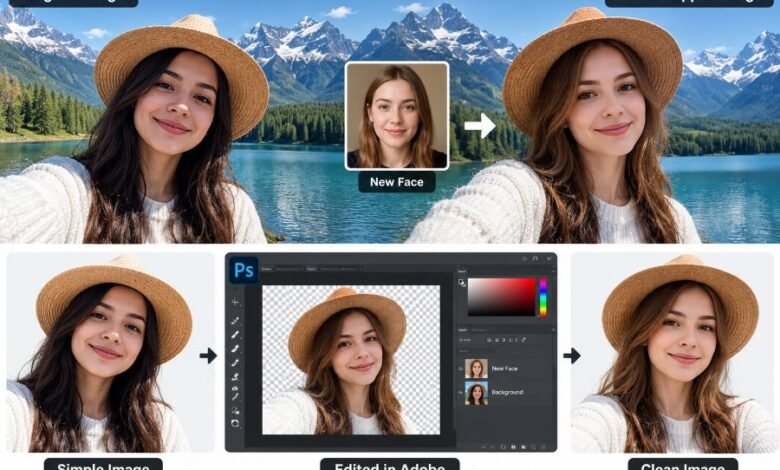
Remaker AI Face Swap is an online tool for changing faces in photos and videos using AI. The process is pretty simple. Upload the main image. Add another face. Then let the system process the swap.
No editing software is required.
That simplicity is a big reason people search for Remaker. Users can work with single photos, group pictures, short clips, GIFs, and supported video files from a web browser.
Remaker has grown beyond face swapping too. Its website now includes AI image editing, background removal, image generation, upscaling, portrait tools, video tools, and other visual features.
Still, face swapping remains a main attraction.
There are some limits, though. Video work can use credits quickly. Privacy matters when uploading real faces. Free access may also depend on the exact tool being used.
Here is what is publicly confirmed.
Quick Facts About Remaker AI Face Swap
| Detail | Information |
|---|---|
| Tool Name | Remaker AI Face Swap |
| Website | Remaker.ai |
| Main Purpose | Swap faces in photos and videos |
| Photo Face Swap | Yes |
| Multiple Face Swap | Yes |
| Video Face Swap | Yes |
| GIF Support | Yes |
| WEBP Support | Yes |
| Batch Photo Processing | Available |
| Browser Based | Yes |
| Standard Video Cost | 1 credit per second |
| Video Upload Limit | Up to 500 MB |
| Video Length Limit | Up to 30 minutes |
| Starting Paid Package | 200 credits for $5.99 |
| Subscription Required | No regular subscription |
| Credit Expiry | Purchased credits do not expire |
| API Access | Available through linked API services |
Pricing and tool limits can change, so users should check the live Remaker website before paying.
What Is Remaker AI Face Swap?
Remaker AI Face Swap is a web-based face replacement tool.
Basically, you provide two images.
One image contains the body, scene, pose, or video you want to keep. The second image provides the face that should appear in the result.
The software detects facial features and tries to place the new face into the original scene while keeping much of the surrounding photo untouched.
The aim is simple.
Change the face. Keep the scene.
Users do not need to manually draw masks around eyes, noses, mouths, or jawlines. Most of that work happens automatically.
Results can vary, though.
A clear source photo usually works better than a dark, blurry, or heavily covered face.
How Remaker AI Face Swap Works
The basic photo process is short.
First, open the face-swap tool.
Then upload the main photo.
Next, upload the replacement face.
Start the swap.
After processing finishes, check the result and save it if it looks right.
That is basically it.
The exact buttons may change as Remaker updates its website, but the main workflow stays close to this format.
For better results, both faces should be easy to see. Sharp photos usually help. Similar head angles can also make the final image look more natural.
Single Photo Face Swap
The standard photo tool handles a single face.
This works well for simple edits where one person’s face needs changing.
Possible uses include:
- funny personal photos
- costume ideas
- character-style edits
- profile images
- social media posts
- private creative tests
- meme-style images
The tool tries to keep details such as the original background, clothing, and body position while changing the face.
But AI cannot fix every image perfectly.
Hair across the face can cause problems. Heavy shadows can too. Tiny faces may also lead to weaker results.
Multiple Face Swap
Group photos need a different setup.
Remaker provides a multiple-face option that can detect several faces inside the same picture.
Users can then choose which faces should change.
This saves time.
Without a multi-face system, someone may need to edit each person separately. Here, several replacements can be handled in one workflow.
This option may suit:
- group photos
- family-style edits
- team pictures
- movie scene edits
- meme images
- social posts
Permission still matters.
Using another person’s face without consent can create privacy or legal problems.
Batch Face Swap
Remaker also supports batch photo work.
The company’s own comparison material has advertised batch processing for up to 50 images.
That feature can help users working with many photos at once.
For example, a creator may want the same face used across several images. Batch processing cuts down repeated uploads.
Still, image quality can differ from photo to photo.
A clean picture may work well.
A blurry one may not.
So users should check every result instead of assuming all batch outputs will look the same.
Remaker AI Video Face Swap
Remaker also supports face replacement inside videos.
The current video interface accepts regular videos as well as GIF and animated WEBP files.
The page currently lists:
- maximum file size of 500 MB
- maximum video length of 30 minutes
- standard processing cost of 1 credit per second
That means a 60-second video may use around 60 credits in the standard mode.
A 5-minute video could use around 300 credits.
Long clips become expensive pretty fast.
HD or other processing modes may have different credit costs, so the live price should always be checked before starting a large job.
Multi-Face Video Swap
Videos sometimes contain several people.
Remaker provides a separate multi-face video option for those situations.
The system can detect more than one face and allow users to choose which people should be changed.
This is useful for scenes with groups.
But video face swapping is harder than working with still photos.
Faces move.
Lighting changes.
People turn sideways.
Objects can cover parts of the face.
Because of that, video results may change from frame to frame.
Short, clear clips usually give AI less to struggle with.
Does Remaker AI Support GIFs?
Yes.
The current video face-swap page lists support for GIF files.
Animated WEBP files are also supported.
That makes Remaker useful for reaction images, short animated content, and simple social posts where a full video file may not be needed.
File limits still apply.
Is Remaker AI Face Swap Free?
Remaker offers some free access, but users should not assume every feature is fully free.
The company says users can access basic tools and may receive free credits.
Paid credits are needed for heavier use and some processing options.
The safest way to describe it is this:
Remaker AI has free access for some uses, but regular or advanced use may require credits.
Free limits can change.
They may also differ by account or tool.
Check the live page first.
Remaker AI Pricing
Remaker uses a credit system.
This is different from many AI services that push users into monthly plans.
The Remaker website currently promotes one-time credit purchases.
Its listed range includes:
- 200 credits for $5.99
- packages with larger credit amounts
- up to 20,000 credits for $299
The company says purchased credits do not expire.
That can suit occasional users.
Someone can buy credits, use part of them, then return later without losing the remaining balance simply because a month ended.
Again, prices can change.
Always check before payment.
Does Remaker AI Require a Subscription?
No regular subscription is currently required.
Remaker promotes a pay-as-you-go setup.
Users buy credits rather than paying a repeating monthly fee.
For someone who only swaps faces now and then, this pricing style may make more sense than keeping another subscription active.
Heavy users should still work out the credit cost first.
Video jobs can burn through credits quickly.
Do Remaker AI Credits Expire?
Remaker currently states that purchased credits do not expire.
That is useful for casual users.
You do not need to rush through the balance during a monthly billing period.
Still, account rules and pricing policies may change later.
Checking the current terms is smart before buying a large credit package.
What Other Tools Does Remaker AI Offer?
Remaker is no longer limited to face swapping.
Its website currently lists several AI tools, including:
- AI photo editing
- AI image generation
- background removal
- image upscaling
- magic eraser tools
- AI portrait generation
- AI headshot generation
- tattoo image generation
- AI video generation
- video enhancement
- photo effects
This makes the website useful for users who need several visual tools under one account.
Face swap is still one of its most searched features.
Does Remaker AI Have an API?
Remaker links users to API services for automated workflows.
API access can be useful for developers building apps or websites that need face-processing features.
Possible uses may include photo apps, automated creative tools, and internal image workflows.
Developers should read the current API documentation before building anything.
Limits can change.
Costs can change too.
Never build around an old rate limit without checking.
Is Remaker AI Face Swap Safe?
There is no simple yes-or-no answer.
Remaker is an active online service with published terms, privacy information, paid features, and working AI tools.
But face images are personal data.
That matters.
When someone uploads a photo to an online AI service, that file leaves the local device and is processed through remote systems.
So avoid uploading highly sensitive material unless you understand how the service handles it.
Examples include:
- identity documents
- confidential work photos
- private client material
- sensitive family pictures
- photos involving children
- legal evidence
- private personal images
For casual photos, the privacy risk may feel acceptable to some users.
Sensitive images need more care.
What Data Can Remaker Collect?
Remaker’s published privacy information describes collection of data such as:
- IP address
- browser information
- device information
- timestamps
- account details
- contact information
- cookies and identifiers
- usage information
- payment-related information
The policy also discusses service providers used for parts of the platform’s operation.
This is normal for many online services, but it means users should not assume that Remaker collects no information.
Read the privacy policy before uploading private material.
How Long Are Face Swap Files Stored?
Remaker has stated short retention periods for certain face-swap workflows.
One official face-swap page has said completed records are stored for about one day, telling users to download results before they disappear.
Retention may differ between tools.
Because of that, it would be wrong to claim that every uploaded file across every Remaker service follows exactly the same deletion schedule.
Check the policy for the tool you use.
That is the safer approach.
Can You Use Anyone’s Face?
No.
Remaker’s terms say users must respect laws, personal rights, and consent requirements.
Using another person’s likeness without proper permission can cause problems.
This becomes much more serious with:
- fake endorsements
- scams
- sexual content
- harassment
- false evidence
- impersonation
- misleading political material
- fake news images
Face-swap software itself is not the problem.
How someone uses it matters.
Remaker AI and Deepfakes
AI face swapping can create convincing fake media.
That is why context matters.
A funny photo shared between consenting friends is very different from a clip made to falsely show a real person saying or doing something.
Remaker’s published rules restrict unlawful or harmful uses.
Users should also follow local laws.
If an edit could fool viewers, clearly labeling it as altered or AI-made may reduce confusion.
Still, a label does not make an illegal use legal.
Can Remaker AI Be Used Commercially?
This needs care.
Remaker’s general terms contain restrictions related to site materials and commercial use.
The wording does not provide a simple blanket promise covering every possible generated output and business use.
So do not assume every generated image can automatically be used for paid advertising, client campaigns, or branded commercial projects.
If money is involved, check the current terms applying to that tool.
That avoids trouble later.
Remaker AI Refund Policy
The refund rules are fairly limited.
Remaker’s current terms state that refund eligibility can depend on conditions including:
- it being the first purchase
- no more than 50 credits being used
- the request being made within three days
- a valid reason being provided
A refund is not guaranteed automatically.
So test the service before buying a large credit pack.
Small first.
Then decide.
What Makes a Good Face Swap?
Source quality matters a lot.
A good replacement face usually has:
- clear lighting
- sharp facial details
- visible eyes
- visible nose
- visible mouth
- similar head direction
- limited blur
Frontal faces usually make things easier.
Side profiles can be tougher.
Heavy sunglasses may hurt accuracy.
Hands covering the face can also confuse detection.
Video adds another issue.
Movement.
Fast head turns and changing light can produce inconsistent frames.
Keep the source simple.
That usually helps.
Common Reasons Face Swaps Look Bad
Bad results are often linked to the source material rather than one single software problem.
Common causes include:
- very small faces
- low-resolution photos
- motion blur
- strong shadows
- extreme facial angles
- masks
- sunglasses
- hair covering the face
- face partly outside the frame
- fast video movement
Try another image first.
That simple change can work.
Remaker AI Face Swap Pros
Remaker has several practical strengths.
Easy browser access: No large desktop editor is needed.
Photo and video support: Users can work with different file types.
Multiple-face tools: Group photos can be handled.
Batch processing: Multiple images can be processed together.
Credit pricing: No normal monthly subscription is required.
Credits do not expire: Purchased balance can stay available.
Several AI tools: The same website contains other photo and video features.
Simple workflow: Most users can figure it out quickly.
Remaker AI Face Swap Cons
There are also weak points.
Video can cost more: Long clips use many credits.
Free limits can change: Free access is not the same across every feature.
Sensitive photos leave your device: Cloud processing creates privacy concerns.
Results depend on source quality: Bad images can produce strange output.
Commercial rights need checking: Business users should read current terms.
Refund conditions are limited: Buying a large pack without testing can be risky.
Advanced control is limited: Professional editors may want more manual control.
Who Should Use Remaker AI?
Remaker can make sense for users who want quick face changes without learning complex editing software.
It may suit:
- casual users
- meme creators
- social media users
- content creators
- people testing character looks
- people editing group photos
- developers testing face-swap workflows
Professional editors may want more control.
Privacy-sensitive users may prefer software that runs locally on their own machine.
The right choice depends on the job.
Is Remaker AI Legit?
Remaker AI is a functioning online AI service.
It has an active website, paid credit system, published terms, privacy pages, face-swap tools, image tools, video tools, and API-related services.
That confirms it is a real service.
But “legit” does not mean every result will be perfect.
It also does not remove privacy concerns.
Users should test quality themselves and read current policies before uploading important files or spending heavily.
Final Thought
Remaker AI Face Swap keeps the process simple.
Upload. Swap. Check.
That is its main appeal.
It supports regular photos, multiple faces, video, GIFs, and batch image work. Its credit system also means users do not have to keep paying a monthly subscription just to keep an account ready.
But use it carefully.
Faces are personal.
Avoid sensitive uploads when privacy matters. Check the credit cost before processing long videos. Read the current terms if the result will be used commercially.
For casual, consent-based face swapping, Remaker gives users a straightforward browser option without requiring advanced editing skills.
Frequently Asked Questions
What is Remaker AI Face Swap?
Remaker AI Face Swap is an online tool that uses AI to replace faces in photos, videos, GIFs, and other supported visual files.
Is Remaker AI Face Swap free?
Some Remaker tools provide free access or free credits, but heavier use and some features may require paid credits.
Does Remaker AI need a subscription?
No regular monthly subscription is currently required. Remaker uses a credit-based payment system.
Do Remaker AI credits expire?
Remaker currently says purchased credits do not expire.
Can Remaker swap multiple faces?
Yes. Remaker provides tools for swapping several faces in group photos and supported videos.
Can Remaker AI swap faces in videos?
Yes. Its video face-swap tool supports regular video files as well as GIF and animated WEBP files.
What is the Remaker AI video limit?
The current video face-swap page lists a maximum upload size of 500 MB and a maximum duration of 30 minutes.
How many credits does video face swap use?
The standard video mode currently displays a rate of 1 credit per second. Other modes may cost differently.
Is Remaker AI safe for private photos?
Users should be careful with sensitive photos because files are uploaded to an online service for processing. Check the current privacy policy before uploading confidential material.
Can I use another person’s face on Remaker?
Users should have proper permission and must follow applicable laws and Remaker’s terms. Misleading, harmful, or non-consensual use can cause serious problems.
Can Remaker AI be used for commercial work?
Do not assume every output has unrestricted commercial rights. Check the current terms for the exact Remaker feature before using an output in paid work.
Does Remaker AI work on mobile?
Because Remaker runs through a website, compatible mobile browsers may access its web tools. Feature behavior can depend on the browser, device, and current site version.